01 YOU
Bring the goal.
Bring OpenAPI 3.0, a critical workflow and the expected result. No agent is required for this path.
AI-ASSISTED TESTING FOR PUBLIC REST APIs
Turn your REST API definition into connected requests and business checks. Review the scenario, run it on Loaduna, and inspect the result.
Your first workflow, set up with our team.
AI proposes. You approve. Loaduna runs.
01 / INSIDE A REAL TEST
One checkout, four connected requests. Explore the reviewed scenario and a recorded result from our controlled sample app.
An API definition + a business rule. “Create an order for a selected product. Read it back and confirm it is the same order, with confirmed status.”
REVIEWED SCENARIO · CONTROLLED SAMPLE
Select a step to see how it connects.
Sign in to the synthetic account. The following requests reuse that session.
POST /loginSelect a product from the catalog. Its identifier connects the catalog response to the order request.
GET /catalogCreate one synthetic order for the selected product. Check that the response reports success and the order is confirmed.
POST /ordersRead back the order just created. Check that its identifier matches and its status is still confirmed.
GET /orders/{order id}Every response reports business success.
The created order has confirmed status.
Read-back matches the created order identifier and confirmed status.
The executor removes this run’s synthetic records.
Initial validation
No additional AI call
No additional AI call
Same approved scenario. Both replays used no additional AI generation.
A SEPARATE RECORDED RUN · 2 OCT 2026
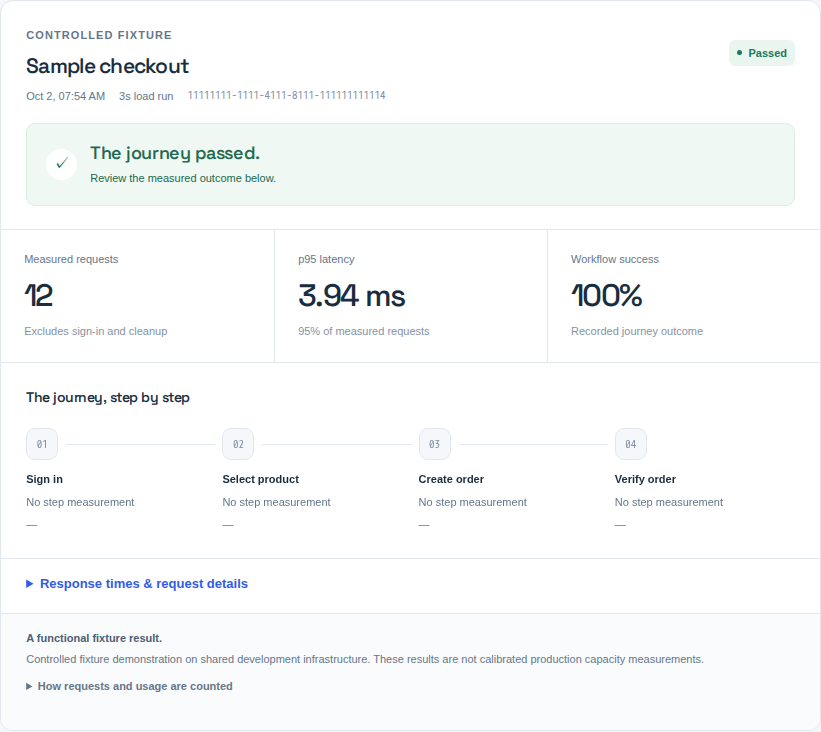
A short scheduled run against our controlled checkout application. Read the result together with the profile that produced it.
✓ Cleanup completed 1 additional request
A small functional demonstration. Shared development infrastructure, not a production capacity benchmark. The latency values do not predict performance under sustained load.
This is a separate execution from the validation and replays above. The arrival target counts complete journeys, not individual HTTP requests. The 16 journey requests include sign-in; the 12 latency samples exclude it. Cleanup is reported separately. The p95 is a percentile of this small sample, not an SLA or a statistically robust capacity estimate.
02 / CHECK THE ACTUAL OUTCOME
An HTTP 200 can still carry the wrong result. Check the returned data and the business outcome alongside the response.
In a separate controlled test, all three requests returned HTTP 200. One business check failed because the response contained ok: false instead of ok: true. Cleanup completed.
{ "ok": false }Recorded failure example · Controlled test application
03 / FROM CONTEXT TO EXECUTION
You define success. Loaduna helps turn it into linked requests and checks.
Bring OpenAPI 3.0, a critical workflow and the expected result. No agent is required for this path.
AI connects the requests and checks. You review the proposal and approve the scope.
Execute on our infrastructure, follow the result, and reuse the approved scenario.
Start with OpenAPI 3.0. JSON or YAML · Public HTTPS REST API · Guided first setup
Check the fit04 / CLEAR BOUNDARIES
Agree what can be tested, how far the run can go, and when it must stop.
Data & accessThe same approved scenario can run again without another AI generation.
PRICING BY AGREED SCOPE
Preparation and execution are quoted separately. You agree the scope and price before paid work.
API context, connected steps, business checks and the initial review.
The target, traffic limits, test window and number of runs.
Reusing an unchanged scenario needs no new AI generation. Execution still uses resources.
05 / GOOD QUESTIONS
Public REST APIs over HTTPS. A scenario can keep a session, carry values between requests and check the business result. We review supported authentication and inputs during setup. Browser UI testing, private networks and arbitrary protocols are outside the current scope.
An OpenAPI 3.0 definition in JSON or YAML, the workflow you want to test, and what a correct result looks like. Selected source files can add context; an agent or full repository access is not required for this workflow. If you have no API definition, contact us to review the available inputs. Your first workflow is set up with our team; public signup and online checkout are not available.
AI proposes the requests, data connections and business checks from the context you supply. You review the proposal and execution scope. A deterministic runner executes the approved scenario and records the measurements. Generating a scenario never starts traffic against your application.
Yes, with verified authority, approved access, a test window and explicit request, rate and duration limits. We start by validating the journey. Sustained load, concurrency ramps and capacity testing require a separately agreed execution profile. The examples on this page show functional validation and a short scheduled fixture run. They do not establish production capacity.
We agree which context to use, the model provider and data handling requirements before you share confidential inputs. API paths and field names can also be sensitive. Test access is arranged separately. Do not email credentials, session cookies or customer records. Arbitrary repository onboarding is assisted, rather than a self-service connection.
The same approved scenario can run again without another AI generation. A changed scenario may need a new proposal and review. Preparation and execution are scoped separately, and execution still consumes resources. We agree the scope and price before paid work; contacting us does not trigger a charge.
Executable scripts stay managed inside Loaduna. Your workspace shows readable scenarios, saved versions and recorded results. Downloadable report exports are not currently available. Invited users can open the workspace through Workspace access.
LET’S START WITH YOUR API
Describe one critical workflow and your target environment. We’ll review the fit and the inputs needed, then agree the first run’s scope and price.
Opens your email app. Or copy the address below.
Keep credentials and customer records out of your message.